
To optimize an HVAC Google Business Profile: verify it, set "HVAC contractor" as the primary category and add only the secondary categories you really do, list every service with your market in the name and link each one to its page, upload real photos of your team and jobs every week, post one service update a week, ask for a review after every job and reply to all of them, answer the questions customers ask, keep your name, address and phone identical everywhere, and follow a weekly and monthly routine so the profile never goes stale.
This guide covers the profile itself: every field, what to put in it, and the routine that keeps it working. How the profile turns into map-pack rankings (proximity, ranking grids, city pages, competitor gaps) has its own guide: HVAC Google Maps SEO: how to rank in the map pack.
Why does an HVAC company need an optimized Google Business Profile?
Because the profile is where most HVAC calls start. A homeowner with a broken AC searches, scans the three map results, checks reviews and calls. A complete, active profile gets you into that shortlist; a half-built one keeps you invisible no matter how many reviews you have or how good your work is.
When a homeowner's AC dies in July, they don't read ten websites. They search, look at the map, check the stars, and call. In my family's service business, the Google Business Profile "is where 80 to 90% of our business is actually coming from" (4:02). The customer path is almost always the same: "People then look up something like generator maintenance near me … They'll then click on your Google Business Profile, they'll look at your reviews, they'll see that you're a legitimate company, then they'll either call right from the profile or they'll click on your website" (4:02). Swap in "furnace repair near me" and that's the HVAC funnel.
The whole job comes down to one line I repeat in almost every video: "tell Google what you do, where you do it, and what you actually offer. The algorithm is so smart that if you do that enough times, it'll actually rank you on Google Maps, on ChatGPT itself" (7:16). Every step below is a way of saying those three things more clearly, in more places, more often than the HVAC companies around you.
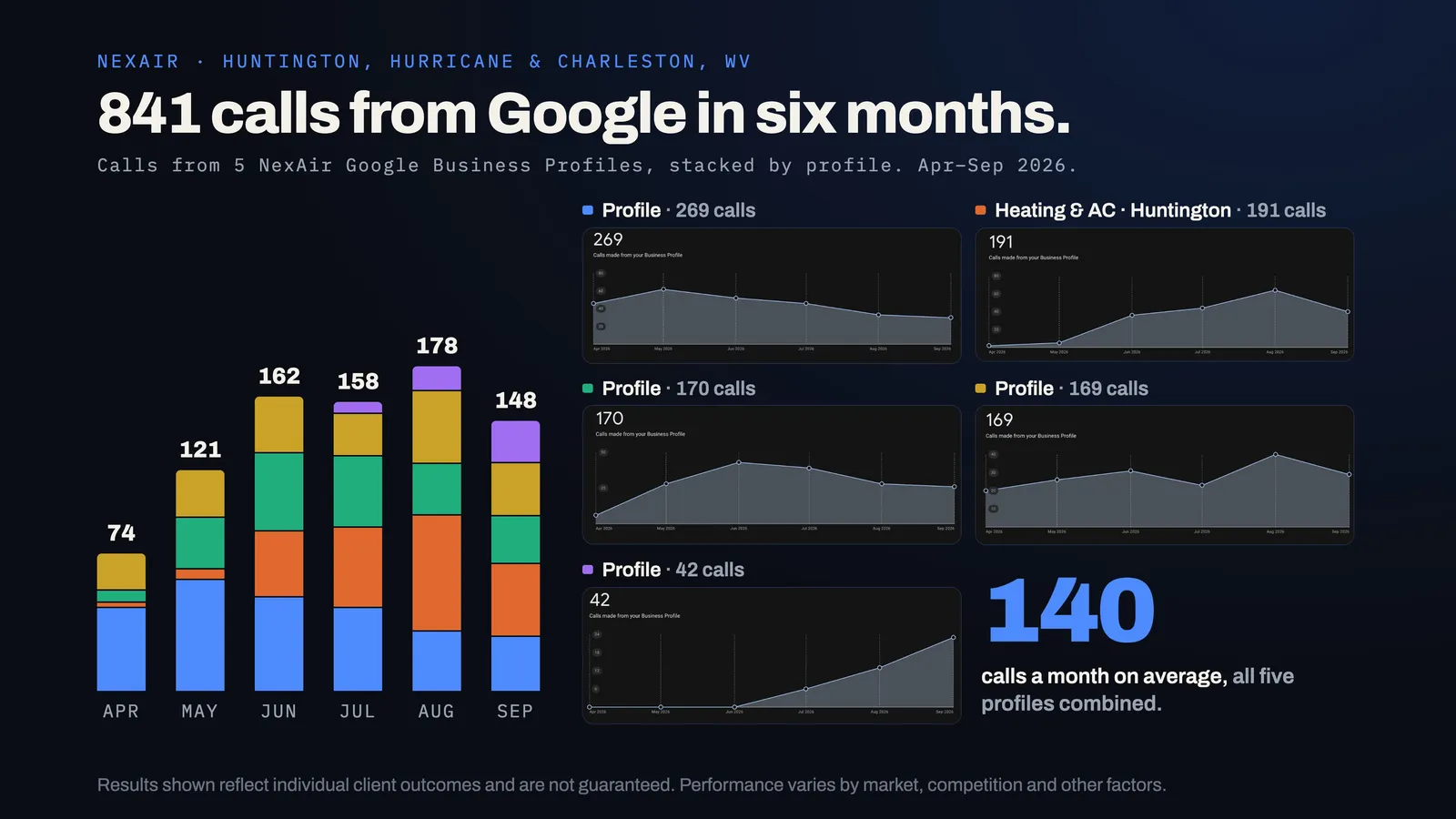
And a half-built profile costs real money. Jeremy Payne, who owns NexAir Home Services, paid an SEO company for a year before we met: "I was taken for a ride for $36,000 and … 12 months after the fact … my Google Business Profile was not completely … not only was it not optimized, it wasn't even fully set up. You know, we were nowhere to be found on maps after 12 months, even though we had been smoking reviews" (10:25). NexAir has since gone from $1M to $4M in yearly revenue and got 841 calls from Google in six months across five profiles.
What results do optimized HVAC Google Business Profiles get?
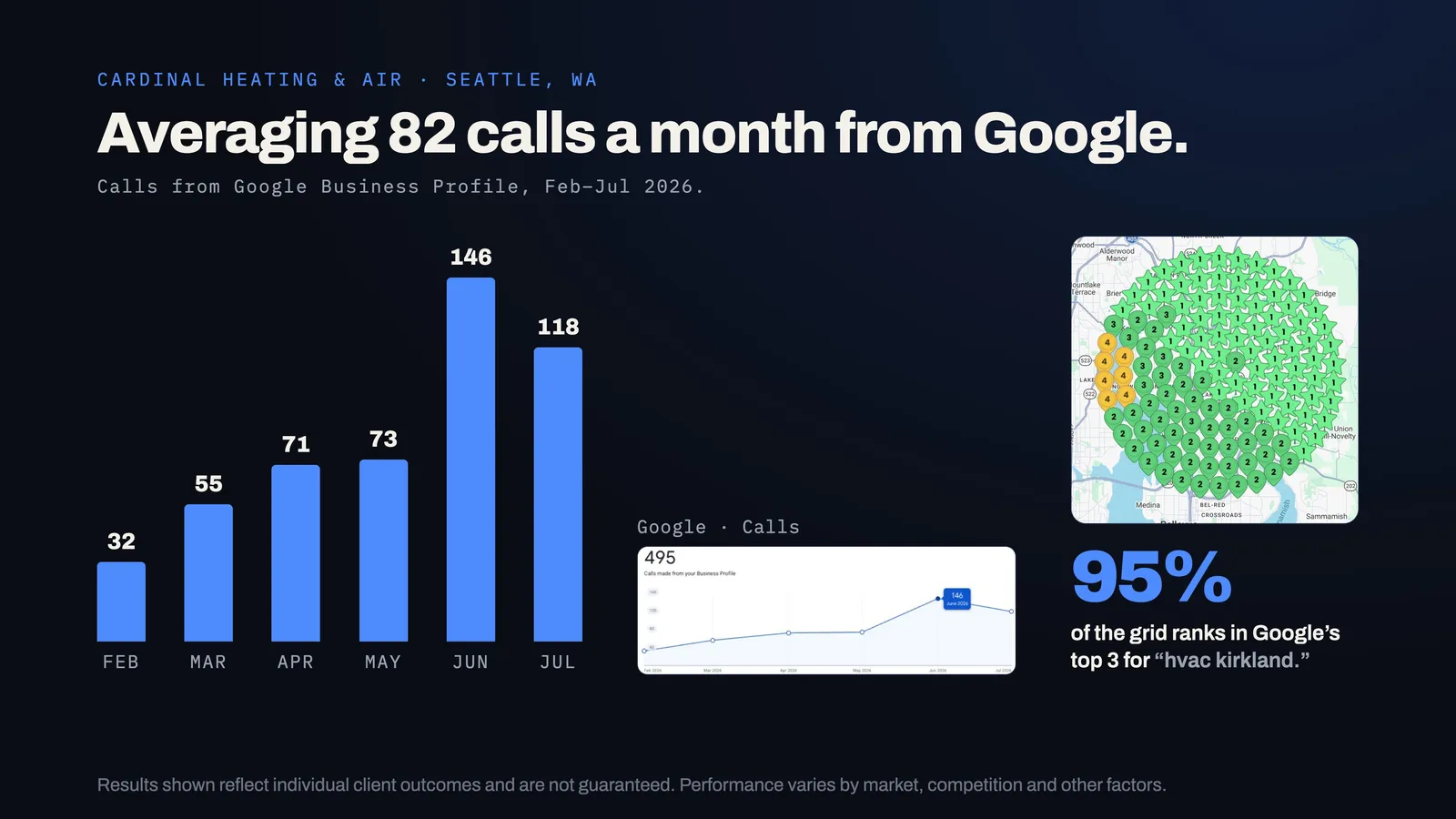
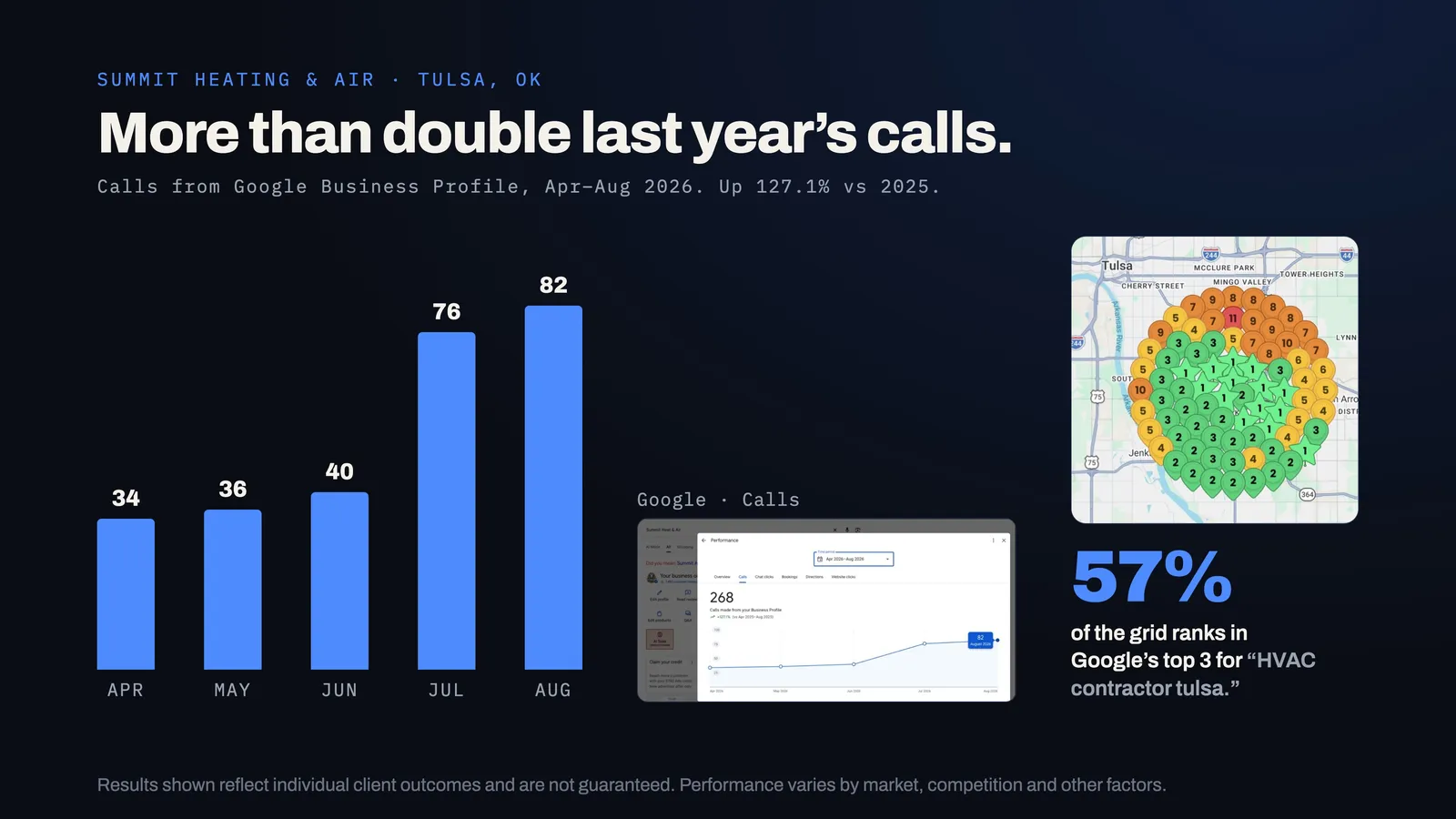
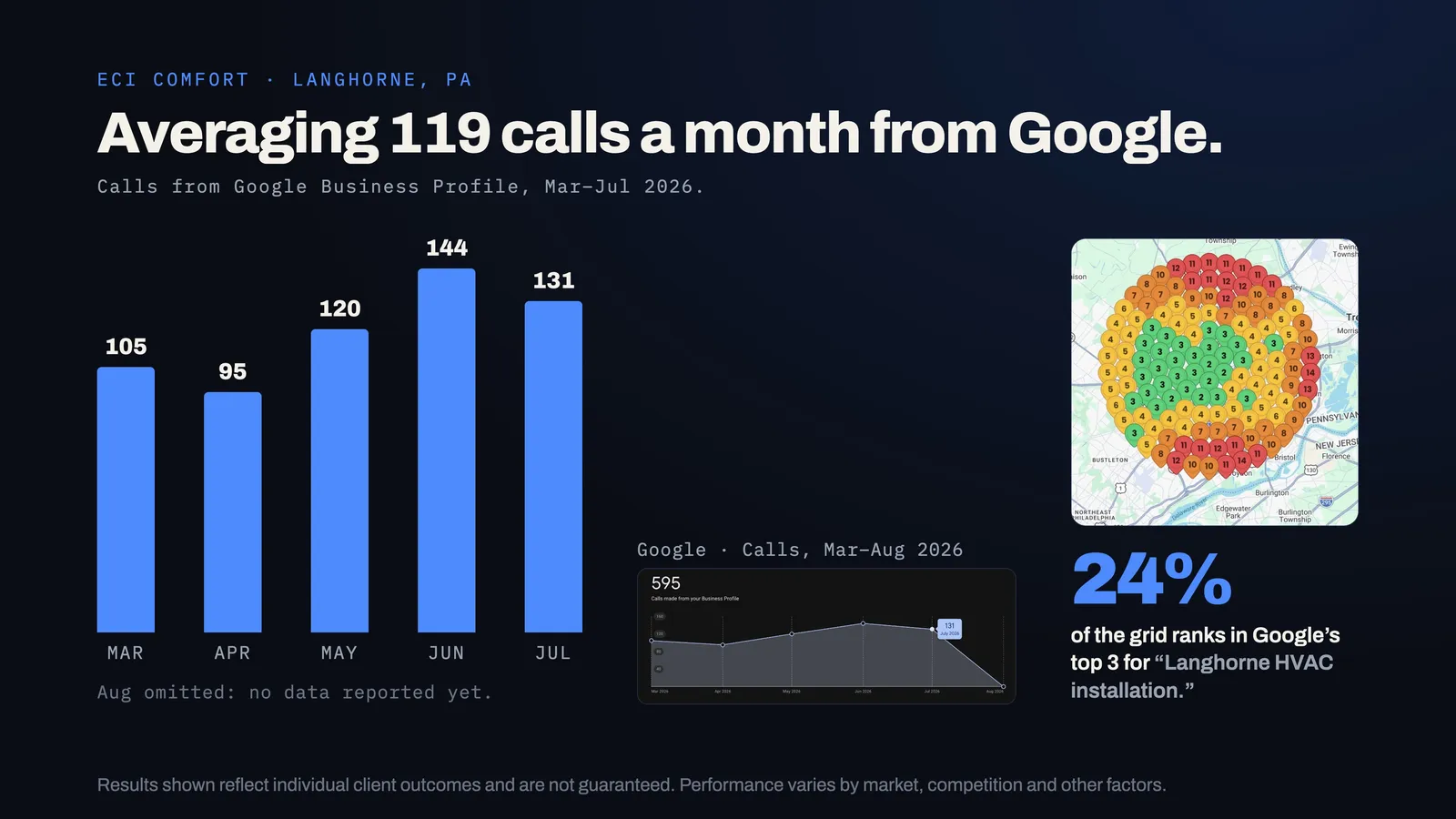
From our own 2026 client reporting: NexAir Home Services got 841 calls from Google in six months across five profiles, Cardinal Heating & Air got 495 calls from February to July, ECI Comfort got 595 from March to July, and Summit Heat & Air's calls rose 127.1% year over year. Results vary by market.
These numbers come straight from our HVAC clients' Business Profile Insights. They're the same results shown on our HVAC marketing page.
NexAir Home Services
Owner: Jeremy Payne
Grew from $1M to $4M in yearly revenue. Across 5 Google Business Profiles, about 140 a month. Top 3 on Google Maps in every market tracked.
 Read the case study
 Cardinal Heating & Air
Owner: Aashish Chenna
A $10M+ a year HVAC company. 146 in June alone. 95% of the ranking grid is in Google's top 3 for “hvac kirkland.”
Summit Heat & Air
Owner: Logan Haskett
The fastest-growing HVAC company in Tulsa. 268 calls from Google Business Profile, Apr–Aug 2026. 57% of the grid is top 3 for “HVAC contractor tulsa.”
 Read the case study
 ECI Comfort
Owner: Chase Musser
About 119 a month, with 131 in July 2026.
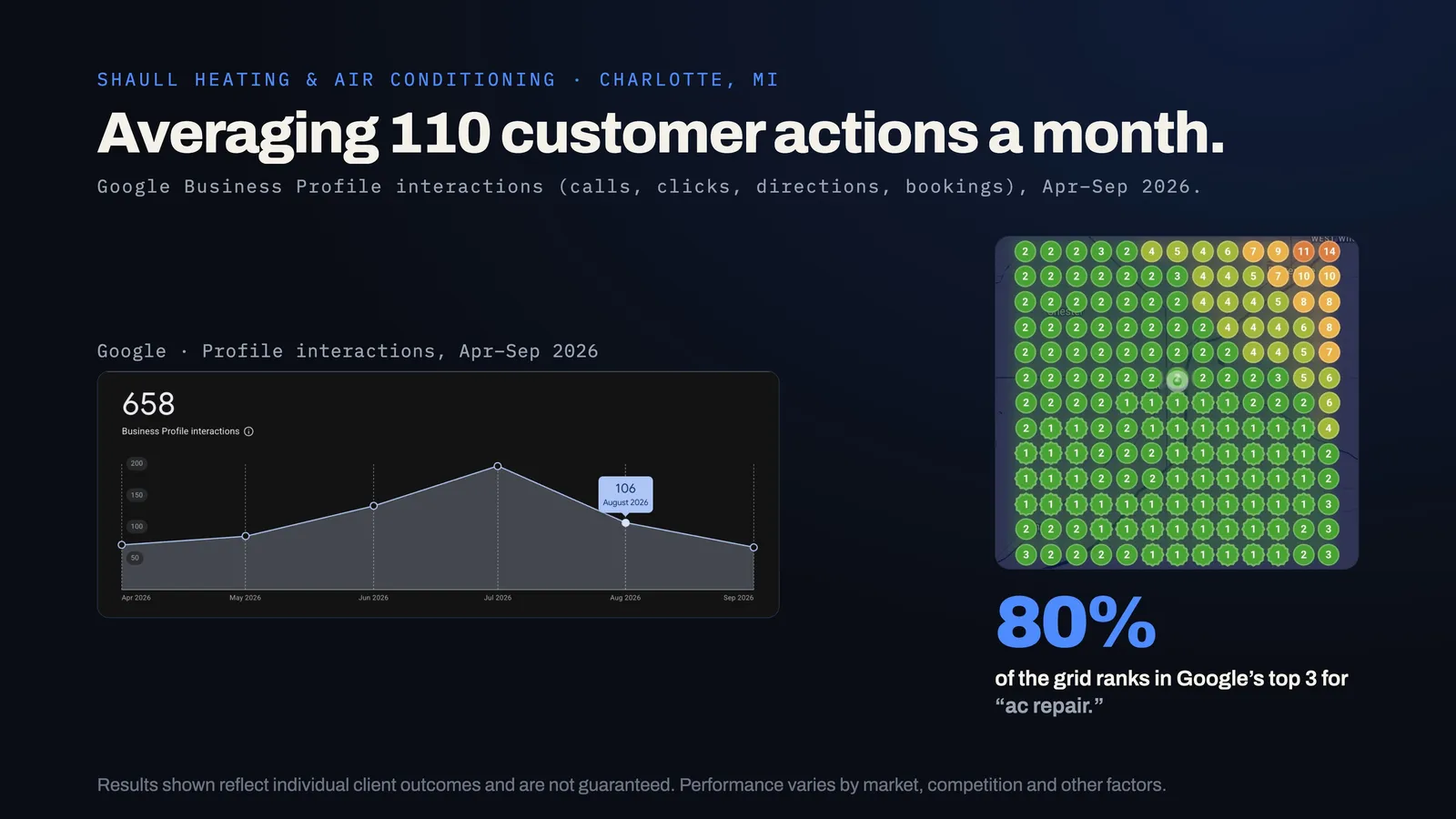
Shaull Heating & Air Conditioning
Owner: Tyler Shaull
About 110 a month. #2 local ranking for “ac repair” (Sep 17, 2026); 80% of the grid is top 3.
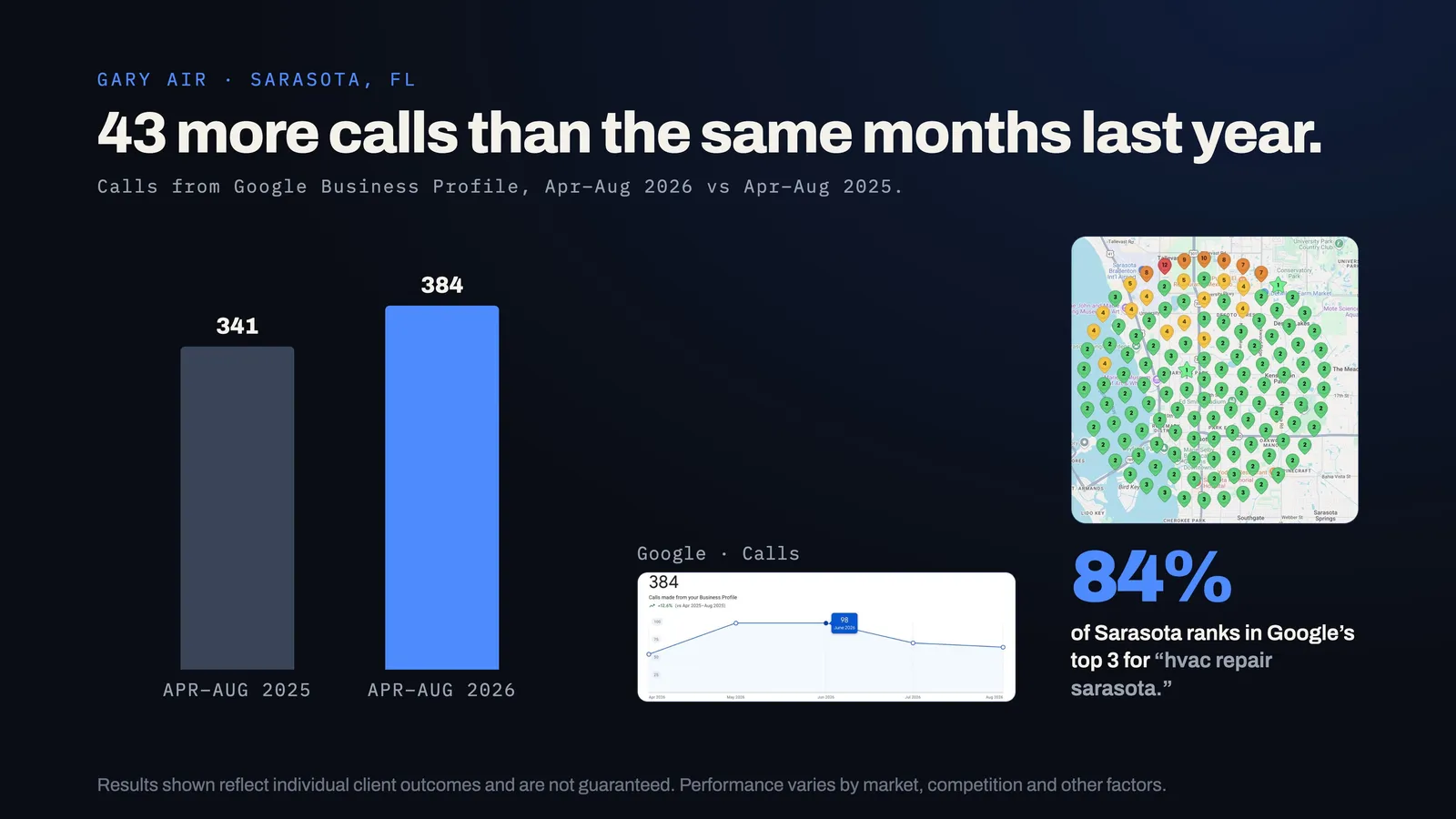
Gary Air
Owner: Rob Brooks
384 calls from Google Business Profile Apr–Aug 2026, up from 341. 84% of Sarasota is top 3 for “hvac repair sarasota.”
Results shown reflect individual client outcomes and are not guaranteed. Performance varies by market, competition and other factors. Source: Stryker Digital client reporting, 2026.
HVAC Google Business Profile checklist: 15 steps in order
Claim and verify, set your real name, pick the primary and secondary categories, set your address and service area, add a local phone and the right website link, write the description, build services and products, set hours and attributes, upload photos, post weekly, run reviews, answer questions, clean citations, then keep a routine.
Here is the full sequence, in the order I'd do it on a new or neglected HVAC profile. Each step links to the detailed section below.
- Claim and verify the profile under an owner account you control, and add your team as managers rather than sharing a login. Details
- Set your exact business name as it appears on your truck, sign and license. No extra keywords. Details
- Choose the primary category (usually HVAC contractor) and up to a handful of secondary categories you really do. Details
- Set your address and service area: hide the address if customers don't visit, and list the cities and counties your trucks really cover. Details
- Add your main phone number and website, pointing the website link at the page that matches this location. Details
- Write the business description: what you do, where, for whom, and since when. Details
- Build the Services list with every service you want calls for. Details
- Build the Products section: one entry per core service with your market in the name, about 1,000 characters, linked to its page. Details
- Set hours, holiday hours and attributes, and add your booking link. Details
- Upload your first photo set: logo, cover, trucks, team, jobs, shop. Details
- Publish your first post and set a weekly post schedule. Details
- Turn on the review process: a text after every completed job, and a reply to every review. Details
- Answer common customer questions on the profile and on your website. Details
- Clean up your citations so your name, address and phone match everywhere. Details
- Start the weekly and monthly routine and track calls from the profile. Details
How do I claim and verify an HVAC Google Business Profile?
Search your business on Google Maps and claim the existing listing instead of making a new one. Verify under a Google account the business owns, usually by video showing your shop, branded truck, tools and license. Merge or remove duplicates, and add staff and agencies as managers, never as owners.
Search your business name on Google Maps. If a profile exists, claim it. If not, create one at business.google.com. Google will ask you to verify, often with a video showing your business: your shop or office, a branded truck, your tools and something that proves you run the business, like a license or utility bill. Have those ready before you start.
Ownership matters more than most owners realize. Set up the profile under a Google account the business owns, not an employee's personal Gmail or a past agency's account. Add your office manager and your marketing team as managers. If you ever part ways with someone, you remove their access instead of losing the profile. One of the first questions I'd ask any company that runs your profile is whether you'll own it.
How to pass video verification the first time
- Record one continuous clip, no cuts or edits, on your phone.
- Start outside: the street sign or a landmark, then your building or a branded truck, so Google can match the location.
- Show the business is real: signage, your truck lettering, equipment, tools and inventory.
- Show you run it: unlock the office or truck, open the business license, a utility bill or your field-service software logged in to your account.
- Don't edit the profile while verification is pending. Changing the name, address or category mid-review is a common reason it gets rejected or delayed.
If it's rejected, read the reason, fix that one thing and try again rather than submitting the same clip.
Find and fix duplicate listings
Google builds listings from public data, so many HVAC companies have more than one without knowing it: an old address, a previous business name, a listing an employee or a past marketing company set up. Duplicates split your reviews and confuse Google about which listing is real. Search Maps for your phone number, old addresses and old names. Claim each duplicate and ask Google support to merge or remove it. Never solve a problem by creating a fresh profile.
Running 10 or more locations
If you grow to ten or more real locations, Google offers bulk verification for chains through a business group. It saves weeks of one-by-one verification and keeps all profiles under one owner account. Every location still needs its own staffed address, local number and matching city page.
Connect the profile and the website both ways
The profile links to your site; make the site link back. Put your exact name, address and local number in the footer, embed the Google map for each real location on its contact or city page, and add a "Read our Google reviews" link to the profile. It ties the two together for Google and makes leaving a review one tap easier.
Turn on alerts for suggested edits
Customers, competitors and Google itself can suggest changes to your profile, and some get applied without you noticing: a new phone number, different hours, a wrong category. Turn on email and app notifications, check the profile at least weekly, and correct anything wrong right away. A wrong phone number for a weekend in July can cost more than a month of SEO work.
A small tip from my own setup: profile strength won't always show completely green. Mine doesn't because "I don't have a Google domain for this. It's a simple Gmail domain … but it is ranking top three on Google Maps, so I don't have to get too picky" (10:33). Chase what moves calls, not a perfect score.
What name, address and phone number should an HVAC profile use?
Use your real, registered business name with no added keywords, your real address (hidden if customers never visit, shown if you have a staffed office they can visit), a local phone number rather than a call center line, and a website link pointing at the page that matches that location.
Business name
Use your real business name, exactly as it appears on your trucks, signage and paperwork. "Smith Heating & Air" stays "Smith Heating & Air." Adding "Best AC Repair Tulsa 24/7" to the name breaks Google's guidelines and is one of the most common reasons HVAC profiles get suspended. More on that in suspension prevention.
One legitimate exception: if your registered legal name already includes service words, like "Summit Heat & Air," use it in full. Names that say what you do tend to help, and if you're starting a new company, or formally registering a DBA you'll actually use on your trucks, signage and paperwork, it's worth choosing a name that says "heating," "air" or "HVAC." What you can't do is type words into the profile name that aren't your real, documented name. Google can ask for proof, and competitors report it.
Address and service area
Google gives you three setups: show a physical address, list service areas only, or both. Follow Google's rule: show the address only if it's a real, staffed location where customers can visit during your hours. If you work from a home office or a shop customers never come to, hide the address and list service areas instead. Showing a home address against the guidelines is a fast way to a suspension.
That said, proximity is one of the strongest local ranking factors, and map results lean toward businesses with a real address near the searcher. If you have a genuine office or showroom with signage, staff and hours, showing it is usually the stronger setup. If you don't, don't invent one. Build relevance and prominence instead, and add real locations as you grow.
For the service-area list, be realistic. List the cities, counties or ZIP codes your trucks really cover, up to Google's limit of 20, and keep them within about a one-and-a-half to two-hour drive of your base, which is Google's own guideline. A profile that claims half the state doesn't rank better in the far half, and it brings calls you'll turn down.
A profile mostly ranks around its verified location, and the service-area list doesn't change that. How to win towns beyond your shop is covered in the service-area strategy section of our map pack guide.
Phone number
Use a local number, not a toll-free or call-center line, and use it everywhere. If you use call tracking, put the tracking number as the primary number on the profile and your main line as an additional number, so your listings still match. Answer it. A profile that sends calls to voicemail during a heat wave wastes every other step on this page.
Website link
Point the website link at the page that best matches the profile: your homepage for your main location, or a city page for a second location. That page should say the same thing the profile says: your service, your city, your phone number.
Add UTM tracking to the link, such as ?utm_source=google&utm_medium=organic&utm_campaign=gbp-main, so Google Analytics separates profile visits from regular organic traffic. With more than one profile, give each its own campaign name. It's the only way to know which profile sends the form fills and online bookings.
What is the best Google Business Profile category for HVAC?
For most companies the primary category is HVAC contractor. In hot markets where cooling drives most revenue, Air conditioning repair service or Air conditioning contractor can fit better; in cold markets, Heating contractor or Furnace repair service. Then add every secondary category you genuinely do, and nothing you don't.
Your primary category is the strongest relevance setting on the profile, so get it right first. Google lets you pick one primary and several secondary categories. Here's what I recommend for HVAC companies:
Pick the primary category for your climate
HVAC is the one trade where the right primary category depends on the weather. Match it to where your revenue comes from:
- Hot markets (think Phoenix, Houston, most of Florida) where cooling is the large majority of revenue: consider Air conditioning repair service or Air conditioning contractor as primary.
- Cold markets (think Minneapolis, Chicago, upstate New York) where heating dominates: consider Heating contractor or Furnace repair service.
- Mixed climates with real summers and real winters, which is most of the country: HVAC contractor.
Whatever you choose as primary, add the others that apply as secondary categories. Before you decide, search your top three keywords and click into the profiles that win. Their primary category is the first thing to match.
| Category | Primary or secondary | Use it when |
|---|---|---|
| HVAC contractor | Primary (most companies) | You do heating and cooling repair, replacement and maintenance. This matches the widest set of searches, including "HVAC contractor tulsa," the term Summit Heat & Air tracks. |
| Air conditioning contractor | Secondary (or primary in hot, AC-heavy markets) | AC repair and installs are a big share of your calls. |
| Heating contractor | Secondary | You service and replace furnaces, boilers or heat pumps. |
| Air conditioning repair service | Secondary | You run repair calls, not only installs. |
| Furnace repair service | Secondary | You do furnace repair in a market with real winters. |
| Air conditioning system supplier | Secondary, optional | You sell and install equipment as a dealer. |
| Air duct cleaning service | Secondary, only if true | You really offer duct cleaning as a service. |
| Plumber | Secondary, only if true | You have a real plumbing division with licensed plumbers. |
Three rules. First, only add categories for work you want calls for. Every category tells Google which searches to show you for, and calls you can't book still cost you time and ratings. Second, check what the top three in your market use; you can see their categories on their profiles. Third, change categories rarely and one at a time, then watch calls for a few weeks. Big swings in categories can drop rankings while Google re-evaluates the profile.
What services and products should an HVAC company list on Google?
List every service you want calls for, each with a short, specific description, then build a product for each core service with your market in the name, a real photo, a description of about 1,000 characters and a link to the matching page on your website. Most competitors leave both sections thin.
This is the section most HVAC profiles leave half-empty, and it's one of the easiest wins. Google gives you two places to describe what you do: the Services list and the Products section. Use both.
The Services list
Under each category, Google suggests services. Turn on every one you do, then add your own. A complete HVAC services list usually includes:
| Group | Services to list |
|---|---|
| Cooling | AC repair, AC installation, AC replacement, AC tune-up, emergency AC repair, heat pump repair, heat pump installation, ductless mini-split installation |
| Heating | Furnace repair, furnace installation, furnace replacement, furnace tune-up, no-heat emergency repair, boiler repair, heat pump heating |
| Maintenance | HVAC maintenance plans, seasonal tune-ups, filter replacement, thermostat installation |
| Indoor air | Air duct cleaning, ductwork repair, air purifiers, humidifiers and dehumidifiers (only what you really offer) |
| Commercial | Commercial HVAC repair, rooftop unit service, commercial maintenance agreements (only if you do it) |
Most HVAC profiles stop at the list. Go one step further: give each service its own short description, a sentence or two that names the job, what's included and where you do it. For example: "Same-day AC repair in Kirkland and Bellevue. Diagnostics, refrigerant leaks, capacitors and compressors on all major brands." Specific, factual, no keyword stuffing. Google and AI tools both read these descriptions to understand exactly what you do.
The Products section
If you run more than one profile, link each location's products to the service pages for that location, such as your Charleston AC repair page from the Charleston profile. That keeps each profile tied to the right part of your site.
Products are where I put the most work, because each one can carry your market name, a long description and a link to your website. On my family's profile, every product names the county: "Generac inspections Rockland County, emergency Generac service, Generac battery replacement, Generac oil change Rockland County. Something I want you guys to see right here is we are targeting Rockland County, that's where most of the searches come from. So, every single one of these products, similar to the H1 tag on your website" (4:34).
For each core HVAC service, create one product:
- Name: the service plus your main market, like "AC repair Tulsa County" or "Furnace replacement Kirkland." Match the H1 of the page you'll link to.
- Category: group products into sections such as Cooling, Heating and Maintenance.
- Photo: a real photo of that job, never stock.
- Description: "about 1,000 characters" (5:05). Say what the service is, what's included, which towns you cover, which brands you work on and how fast you respond.
- Link: connect it to the matching service page. "This just increases your click-through rate and gets people to book a job with you quicker, easier, and more efficiently" (5:38).
How should I write the HVAC business description, hours and attributes?
Lead the 750-character description with your main services and market, then explain what makes you different, without links or keyword stuffing. Keep hours exact, including holiday and true emergency hours, because searchers filter for businesses open now. Turn on every attribute that's true and add your booking link.
"What I like to tell people is just fill out this profile as much as you possibly can" (10:33). Every empty field is a missed chance to say what you do and where.
- Business description (up to 750 characters). Lead with your main services and your main market in the first sentence, because that's what shows before "more." Then cover what makes you different: years in business, family-owned, emergency service, the brands you install, the towns you cover. Write it for a homeowner, not for Google. No links, no phone number, no promotions.
- Hours. Your real office hours, plus any after-hours or emergency availability you truly offer. Google tends to favor businesses that are open when someone searches, and "open now" is a filter people tap. If someone really answers the phone at 10 p.m., your hours should say so. If nobody does, don't claim 24/7; the reviews will tell on you. Set holiday hours before every holiday. A profile showing "closed" on a cold Saturday sends that call to a competitor.
- Attributes. Turn on everything that's true: online estimates, onsite services, veteran-owned or women-owned if it applies, and the payment types you take.
- Booking link. Link to your online scheduling page if you have one. On your website, give people two ways to book on every screen: "people are able to book on your website in two different options at all times when scrolling" (2:55).
- Opening date, logo and cover photo. Fill them in. They're small, but they make the profile look complete and real.
Want us to audit your HVAC Google Business Profile against this checklist? Book a free growth call.
Book a Growth CallWhat photos should an HVAC company post on Google, and how often?
Real photos only: techs on jobs, before-and-after installs, wrapped trucks at job sites, the team and the shop. Make two photos per job a tech habit, collect them in a shared folder and upload the best ones once or twice a week. Never use stock photos.
Photos prove you're a real company with real trucks and real techs. The one hard rule: "you don't use stock photos when you're doing this" (9:59). Customers can spot them, and so can Google.
The cadence I recommend for an established company: "if you're at 500k plus in revenue, I highly recommend posting your employees, posting yourself, your family, whoever you can, products about once or twice a week to just get this profile looking more real to your target customer" (10:15). And put people in them: "I highly recommend you have your team and your employees in these photos" (9:27).
The HVAC photo shot list
| Type | What to shoot | How often |
|---|---|---|
| Logo and cover | Clean logo file; a cover photo of your team with branded trucks | Once, refresh yearly |
| Team | Techs in uniform, the owner, office staff, the whole crew | Monthly |
| Jobs in progress | Techs working on condensers, furnaces, air handlers, mini-split heads | Every week |
| Before and after | Old rusted unit next to the new install; a messy mechanical room cleaned up | Every install |
| Trucks and vans | Wrapped vehicles at real job sites (without showing the customer's house number) | Monthly |
| Shop and office | Exterior signage, inventory, the dispatch desk | Quarterly |
| Equipment | The brands and systems you install, on the job | As installed |
The easy way to keep this going: make it a tech habit. Two photos per job are part of closing the ticket, just like the invoice. They go into a shared folder by the end of each day, and every Friday whoever runs the profile picks the best five to ten and uploads them. Ask the customer before photographing anything inside their home, and keep house numbers and faces of customers out of the shot.
A few quality rules: shoot in daylight, horizontal, with the equipment or tech filling the frame. Name the file for what it shows, like heat-pump-install-kirkland.jpg, so you can find it later. Don't add fake location data to photos or use AI-generated job photos on an established company's profile. Customers want proof, and anything that looks staged works against you.
Do Google Business Profile posts help HVAC companies?
Posts mostly help customers: they show you're active and promote seasonal services and maintenance plans. Their biggest SEO value is the link button, which sends searchers and Google to a specific service or city page. Post once a week, one service per post, with a real photo, a town and a link.
Posts (Google calls them updates) show Google and customers that the profile is active. Most HVAC companies post once and forget. Post at least once a week.
Be clear about what posts do. They're first a customer channel: seasonal tune-up reminders, maintenance plan sign-ups, new services, holiday hours. On their own, posts are rarely what lifts a profile in the rankings. The part that does real SEO work is the link button. Every post can send searchers, and Google, to a specific service or city page, which helps those pages get found and keeps them tied to your profile.
Every post should have one service, one real photo, one town, and one link. I link each post to the service page it's about: "In this post I'm talking about Generac maintenance right here, and I'm actually embedding that link right into the Google post" (7:48). "This is another thing that communicates with the algorithm" (7:32).
Post template
"Just finished a [service] for a family in [town]. [One sentence about the problem and the fix]. If your [system] is [symptom], our team covers [town, town and town]. Book online or call today." Then add the photo and the "Learn more" or "Book" button linked to the service page.
Post calendar
| Months | Post themes |
|---|---|
| January–February | No-heat emergency repair, furnace repair jobs, heat pump performance in the cold, maintenance plan sign-ups |
| March–April | AC tune-ups before summer, replacement planning, indoor air quality, new installs |
| May–June | First-heat-wave AC repair, AC installations, mini-splits for hot rooms, thermostat upgrades |
| July–August | Emergency AC repair, before-and-after installs, team photos from busy days, customer stories |
| September–October | Furnace tune-ups and safety checks, heat pump installs, maintenance plan renewals |
| November–December | First-cold-snap no-heat calls, holiday hours, furnace replacements, year-end thank-you to customers and team |
Plan around your weather, not the calendar. When a heat wave or cold snap is forecast, post the matching emergency service the day before.
How do HVAC companies get more Google reviews?
Run a process on every job: the tech asks in person with a QR code, a text follows within a few hours, then reminders at about one and three days. Reply to every review within a day, naming the service and town. Our best-performing clients are getting 25 new reviews per month.
"Reviews are probably one of the most important ranking factors when it comes to ranking a Google Business Profile" (5:53). Our best-performing clients are getting 25 new reviews per month. That doesn't come from one email blast. It comes from a process that runs on every job. The same reviews show on your Local Services Ads, where rating and review count help decide who ranks. How review velocity moves rankings is covered in the map pack guide; here's how to get the reviews.
The review process, step by step
- Get the link and a QR code. Copy your review link from the profile ("Ask for reviews"), shorten it, and print it as a QR code on a card every tech carries and on the invoice.
- The tech asks in person when the system is running and the customer is happy, and hands over the QR code. People are far more likely to review a person who just helped them than a company that emails them later.
- A text goes out two to three hours later to anyone who didn't leave one. Automate it in your field-service software or phone system. Texts get answered; emails mostly don't. As I say about booking forms, "people don't answer emails, but with phone numbers, you can text them and call them" (1:19).
- Follow up at about 24 hours and again at about 72 hours if there's still no review. Then stop. More than that is pestering.
- Make a weekly call block. Once a week, the office manager or, in a smaller company, the owner calls happy customers who never left a review. A short "thanks for choosing us" call converts surprisingly well.
- Track new reviews per tech, per week, and recognize the techs who get named, with a team board or a monthly competition.
Aim for a steady flow rather than bursts. Fifty reviews in one week after a campaign and then nothing for two months looks unnatural to customers and to Google. Running the process on every job is what produces a smooth, steady curve.
Request scripts
In person (tech): "Glad we got your AC running again. We're a local company and Google reviews are how neighbors find us. I'm going to text you a link. If you have 30 seconds, it would mean a lot, and if you mention what we fixed, that helps even more."
Text message: "Hi [first name], thanks for choosing [business] for your [service] today. [Tech name] would really appreciate a quick Google review: [link]. Thank you!"
Reminder: "Hi [first name], just checking that your [system] is running well after Tuesday's visit. If you have a minute, a quick review helps our small team a lot: [link]."
Ask every customer, not just the happy ones you pick. Don't offer discounts, gifts or entries in exchange for reviews, and don't write reviews for customers. Those break Google's rules and can get reviews removed or the profile penalized.
Reply templates
Reply to every review within a day, and use the reply to say what you did and where. My standard: "Thank you, Fred, for the five-star review. We appreciate you choosing Rockland County Generac Maintenance for dependable Generac generator service in Rockland County" (6:09). Google "will then take that signal and it will talk to the algorithm and it will show your business more by something so small like that" (6:26).
- Five stars: "Thank you, [name], for the five-star review! We appreciate you choosing [business] for your [service] in [town]. [Tech] will be glad to hear it."
- Five stars, no text: "Thanks for the five stars, [name]. We're glad we could help with your heating and cooling in [town]."
- Mixed (three or four stars): "Thanks for the honest feedback, [name]. We're glad your [system] is working, and we're sorry about [issue]. I'd like to make it right. Please call our office and ask for [manager]."
- Negative: "[Name], I'm sorry about your experience. That isn't the standard we hold our team to. I'd like to understand what happened and fix it. Please call me directly at the office and ask for [owner/manager]." Keep it calm, short and free of customer details. Future customers read these replies closely.
One warning: reviews multiply a well-built profile, they can't replace one. Jeremy was "smoking reviews" and still invisible on Maps until the profile itself was fixed.

In that interview Jeremy names what matters most: "SEO, setting up the profiles correctly, pouring it into Google reviews and establishing that online presence because that is that is the king when it comes to demand capture" (10:06).
What questions should an HVAC company answer on its Google profile?
The ten customers ask before calling: emergency hours, towns served, brands, heat pumps and mini-splits, maintenance plans, financing, licensing, response time, estimates and commercial work. Since Google replaced public Q&A with an AI Ask feature, those answers must live in your profile fields, reviews and website FAQs.
Customers ask the same ten questions before they call. For years HVAC companies answered them in the profile's Questions and Answers section. Google removed that public Q&A from Maps in December 2025 and replaced it with an AI "Ask" feature. When a homeowner asks "do they service heat pumps?" or "are they open Sunday?", Google now builds the answer itself from your profile fields, your reviews, your website and other sources it trusts.
That changes the job. You can't type the answer into a box any more; you have to make sure the answer exists, and says the same thing, everywhere Google looks:
- On the profile: services, products, attributes, hours and description cover most of these questions directly.
- On your website: an FAQ on each service page and city page, in plain two- or three-sentence answers, with FAQ schema.
- In reviews: customers who mention "heat pump," "Sunday" or "Kirkland" in a review answer the question for you. Your replies can confirm it.
- One phrase per service: if the profile says "ductless mini-split installation," don't call it "split systems" on the site and "wall units" in posts. Consistent wording is easier for AI to trust.
If an old questions section still shows in your dashboard, answer anything open there too. Then test it: ask Google Maps your top questions about your own business every quarter and fix whatever it gets wrong or can't answer.
The questions every HVAC company should answer:
- Do you offer 24/7 or same-day emergency service?
- Which towns and counties do you serve?
- Which brands do you install and repair?
- Do you service heat pumps and ductless mini-splits?
- Do you offer maintenance plans, and what's included?
- Do you offer financing on new systems?
- Are your technicians licensed and insured?
- How quickly can you come out?
- Do you give free estimates on replacements?
- Do you work on commercial systems?
Make sure every one of these has a clear answer on the profile or your website, in one or two plain sentences with the same facts in both places. Don't stuff keywords into answers. Write the way you'd answer on the phone.
How do I make my HVAC business listings consistent (NAP)?
Write one exact version of your name, address and phone number, put it on your website and schema, then claim and match it on Bing Places, Apple Business, Yelp, Facebook, the BBB, Angi and manufacturer dealer locators. Hunt down old addresses and numbers, fix duplicates, and recheck every quarter.
NAP is your business name, address and phone number. Citations are the other places online that list them. When those don't match the profile (an old address, a different phone number, "Heating & Air" in one place and "HVAC" in another), Google gets less sure they're all the same company. Here's the clean-up, step by step:
- Write your one true NAP. Exact name, exact address format (Suite vs. Ste.), one main phone number. Save it in a document everyone uses.
- Fix your own website first. Put the NAP in the footer and on the contact page, and add LocalBusiness or HVACBusiness schema with the same details.
- Claim the big platforms: Bing Places, Apple Business Connect, Yelp, Facebook, the BBB, Nextdoor, Angi, Thumbtack and Yellow Pages.
- Claim HVAC-specific listings: your equipment manufacturers' dealer locators, trade association member directories and your local chamber of commerce.
- Search for old versions. Google your old addresses, old phone numbers and old business names. Update or close every listing you find.
- Remove duplicates. Two listings for one location on the same site confuse customers and search engines alike.
- Do the other maps properly. Bing Places can import your Google listing in a few minutes, and Apple Business (formerly Apple Business Connect) controls how you look in Apple Maps and Siri. Many iPhone owners never open Google Maps.
- After a move, rebrand or phone change, rebuild everything. Updating the Google profile is step one, not the finish line. An old address sitting in dozens of directories can drag rankings down for months.
- Recheck every quarter.
This is boring work, which is exactly why a lot of your competitors skip it.
How do you keep an HVAC Google Business Profile from being suspended?
Use your legal business name only, a real staffed address or service areas, one profile per location, and real reviews asked for the same way every time. Change big fields one at a time, keep your license and a utility bill on file, and control who can access the profile.
A suspended profile means no map listing and no calls, sometimes for weeks, and it always seems to happen in peak season. Most suspensions come from shortcuts or from big, sudden changes.
The short version: use your legal name only, a real staffed address or service areas, one profile per location, real reviews asked for the same way every time, and change big fields one at a time. Keep your license, registration and a utility bill on file. If it happens anyway, don't create a new profile. Fix the cause and appeal once, with documents that match the profile exactly.
The full process, from the first 24 hours to a denied appeal, is in our guide to a suspended Google Business Profile and how HVAC companies get reinstated.
How do you maintain an HVAC Google Business Profile week to week?
Daily, reply to reviews and check for suggested edits. Weekly, upload photos, publish a post and chase missing reviews. Monthly, review calls and interactions year over year and refresh products. Quarterly, audit citations, categories, hours and manager access. Before each season, update posts, products and holiday hours.
A profile isn't a one-time setup. The companies that stay on top keep it active every week. This is the routine we run for our HVAC clients:
| When | Task |
|---|---|
| Daily | Reply to new reviews; check for new questions and edits suggested by the public |
| Weekly | Upload one or two real job or team photos; publish one service post with a link; count new reviews and follow up on jobs without one |
| Monthly | Review calls, website clicks, direction requests and bookings in the Performance report; compare with the same month last year; refresh one or two product descriptions; add any new services |
| Quarterly | Audit citations and NAP; review categories against the top competitors; check that hours, holiday hours and the service area are current; review manager access |
| Before each season | Update posts and products for the coming season; set holiday hours; refresh the cover photo |
What to measure
Measure the profile by calls, not by how it looks. "You can really see what happens when you start ranking on Google Maps and your business starts gaining traction with Google. Calls start going up, and you can actually track that graph and see the difference" (8:39). Each month, track:
- Calls from the profile (841 in six months for NexAir, 495 Feb–Jul for Cardinal, 595 Mar–Jul for ECI Comfort)
- Total interactions: calls, website clicks, direction requests and bookings (658 Apr–Sep for Shaull)
- Year-over-year change for the same months, because HVAC is seasonal (Summit +127.1%, Gary Air +12.6%)
- New reviews per month, against the 25-a-month pace of our best clients
- Booked jobs traced back to profile calls
Rankings across your service area are measured with ranking grids. How to read them, with our clients' real grids, is in HVAC Google Maps SEO.
HVAC Google Business Profile FAQ
Quick answers to the questions HVAC owners ask most about their Google Business Profile: categories, services, photos, posts, reviews, questions, suspensions, ownership and upkeep. For ranking questions such as grids, proximity and competitors, see our HVAC Google Maps SEO guide, which covers the map pack side in depth.
What is HVAC Google Business Profile optimization?
Setting up and running an HVAC company's Google Business Profile so every field works: the right primary and secondary categories, a full services and products list, real photos, weekly posts, a review process with replies, answered questions, consistent name, address and phone everywhere, and a weekly and monthly routine.
What is the best Google Business Profile category for an HVAC company?
For most heating and cooling companies the primary category should be HVAC contractor. Add secondary categories such as Air conditioning contractor, Heating contractor, Air conditioning repair service and Furnace repair service only for work you actually do.
What services should an HVAC company list on Google Business Profile?
Every service you want calls for: AC repair, installation, replacement and tune-ups, emergency AC repair, furnace repair, installation and replacement, heat pumps, ductless mini-splits, maintenance plans and, if you offer them, duct cleaning and commercial HVAC. Add a product for each core service with your market in the name and a link to its page.
How often should an HVAC company post photos and updates?
Upload real photos of your team, trucks and jobs once or twice a week, and publish at least one service post a week with a photo, the town and a link to the service page. Never use stock photos.
How do I get more Google reviews for my HVAC company?
Ask after every completed job: the tech asks in person and hands over a QR code, a text with your review link goes out two to three hours later, with follow-ups at about 24 and 72 hours, plus a weekly call block for happy customers who never left one. Our best-performing clients are getting 25 new reviews per month. Never pay or offer discounts for reviews.
Should I reply to every Google review?
Yes. Reply to every review within a day, naming the service and the town, for example: "We appreciate you choosing us for your furnace replacement in Kirkland." Reply to negative reviews calmly and offer to fix it offline.
Does Google Business Profile still have Q&A for HVAC companies?
Google removed public Questions and Answers from Maps in December 2025 and replaced it with an AI Ask feature that answers from your profile, reviews and website. Put clear answers about emergency service, towns served, brands, heat pumps, maintenance plans, financing and licensing on your profile and in service-page FAQs.
What can get an HVAC Google Business Profile suspended?
Keyword stuffing the business name, fake or virtual-office addresses, duplicate profiles, fake or incentivized reviews, and many big edits at once. Keep your license, a utility bill and photos of your signage and trucks ready in case Google asks you to verify.
How do I get a suspended HVAC profile reinstated?
Don't create a new profile. Fix whatever breaks the guidelines, then submit one appeal in Google's Business Profile appeals tool with documents whose name and address match the profile. Our suspension guide walks through every step.
Do I need to keep updating my Google Business Profile after setup?
Yes. Reply to reviews daily, add photos and a post every week, review performance and refresh products monthly, and audit citations, categories and hours every quarter.
Should an HVAC company show its address on Google Business Profile?
Only if it's a real, staffed location customers can visit during your hours. If you work from home or a shop customers never visit, hide the address and list up to 20 service areas within about a two-hour drive. Never use a virtual office or mailbox to get an address.
Should HVAC companies use a call tracking number on Google Business Profile?
Use one local number consistently. If you track calls, set the tracking number as the primary number and keep your main number as an additional phone, so your listings stay consistent everywhere.
Can I put keywords in my HVAC business name on Google?
Only if they're part of your real, registered name that you use on trucks, signs and paperwork. Adding words like "AC Repair Kirkland" that aren't your legal name breaks Google's guidelines and is a common cause of suspensions.
Want your HVAC profile built and run this way? Book a free growth call.
Book a Growth Call