
A good pest control website does three jobs: it gets found for the pests and towns you serve, it earns trust fast, and it makes calling or booking easy on a phone. That means a page for each pest you treat, a page for each city or location you serve, your license and real reviews on the pages people decide from, real photos of your team, a tap-to-call number visible on every screen, a short form, and pages that load quickly on mobile. Avoid safety claims like "safe" or "harmless" for treatments, keep every claim accurate, and track calls and forms by page so you know which pages produce customers.
Most pest control customers find a company on Google, look at two or three websites on their phone, and call one. The website has a few seconds to answer three questions: Do they treat my pest? Do they work in my town? Can I trust them in my house? A site that answers all three clearly gets the call. A site that looks old, loads slowly or hides the phone number usually doesn't, even when its rankings are decent.
This guide covers what pages a pest control website needs, how to build each one, what trust signals matter, how to handle mobile speed, structured data and claims about treatments, and when to redesign versus refresh. It draws on Bodhi's live audit of a $107K/month pest control company's site and on how our pest control clients' sites are built.
What does a pest control website need to do?
Three jobs: get found for each pest and town, convince a worried homeowner you're safe and local, and make calling or booking take one tap:
| Job | What it takes |
|---|---|
| Get found | A page for each pest, each service and each town, with clear titles and headings, linked from your Google Business Profile |
| Earn trust | License information, real reviews linked to Google, real photos of technicians and trucks, plain explanations of treatments |
| Get the call | Tap-to-call phone number on every screen, a short form, online booking if your schedule allows |
| Sell the plan | A clear recurring plan page: what's included, how often, what happens if pests come back |
| Prove results | Call and form tracking by page, tied to your CRM |
Every page should do at least two of these. A page that only exists to rank, with nothing useful for a homeowner, rarely ranks for long anyway.
What pages should a pest control website have?
A homepage, a page for each pest and service, a page for each office and main town, a recurring plan page, commercial pages if you do commercial work, reviews and about:
| Page type | Examples | Why |
|---|---|---|
| Homepage | One | Your brand search landing page. Explains who you are, what you treat and where |
| Pest pages | Ants, roaches, spiders, rodents, termites, bed bugs, mosquitoes, wasps, fleas and ticks, wildlife if licensed | People search for the pest they have |
| Service pages | Termite inspections, rodent exclusion, crawl space work, commercial service | Higher-value work deserves its own page |
| Location pages | One for each real office | Your Google Business Profile links here |
| City pages | The towns you service around each office | Rank in nearby towns in regular search results |
| Recurring plan page | Your residential plan options | Where most revenue comes from |
| Commercial page | Restaurants, property management, warehouses, healthcare | Commercial buyers look for industry-specific pages |
| About and licensing | Your story, team, state licenses, training | Trust, and what AI tools and Google read about your company |
| Reviews | Real reviews linked to your Google profile | Proof, if it links to the source |
| Contact and booking | Phone, form, hours, service area, booking | The conversion page |
| FAQ and guides | Identification guides, seasonal guides, treatment prep | Answer the questions customers ask before calling |
Start with the pests and towns that bring the most revenue, then fill in the rest. Our pest control SEO guide covers keyword research and how to prioritize pages.
What should a pest control homepage include?
The homepage is where people land when they search your company name, often after meeting a door-to-door rep, seeing a truck or getting a referral. It needs to confirm quickly that they're in the right place.
- A plain headline that says what you do and where: "Pest control and termite service in [region]."
- Your phone number, tap-to-call on mobile, in the header.
- Your rating and review count near the top, linked to your Google profile.
- The pests you treat, each linking to its own page.
- The areas you serve, linking to location and city pages.
- How service works: inspection, treatment, follow-up and the recurring plan, in a few steps.
- Real photos of your technicians, trucks and office.
- License information and years in business.
Skip sliders, autoplay videos and big stock images at the top. They slow the page on phones and push the important information down.
How should a pest page be built?
Pest pages bring in a lot of your search traffic, and they're where many customers decide to call. A strong pest page answers the questions a worried homeowner actually has, in order:
- Is this the pest I have? Signs, identification tips and real photos.
- How serious is it? What happens if it's ignored, stated accurately and without scare tactics.
- How do you treat it? Inspection, treatment approach, follow-up visits, and how long it usually takes.
- What do I need to do? Prep before the visit, and what to expect after, such as seeing more insects for a short time after some treatments.
- Is it covered by a plan? Which pests your recurring plan covers and which need separate service.
- Who are you? Reviews that mention this pest, license information and photos.
- How do I get started? Phone and form, without making them scroll back to the top.
Write each pest page from scratch. A termite page and an ant page that share 80% of their text help neither one. Real details from your technicians, such as the pests most common in your area and where they find them, make a page better than anything a template can produce.

Example: how a termite page might be laid out
| Section | What goes in it |
|---|---|
| Opening | Termite inspection and treatment in your area, who you are, your phone number |
| Signs of termites | Swarmers or discarded wings near windows, mud tubes on foundations, damaged wood, with your own photos |
| Termites vs. flying ants | A plain comparison, since this is one of the most searched questions |
| Termites in your area | The species your technicians see locally and when swarms usually happen, citing your state extension service |
| The inspection | What the inspector checks, how long it takes, what the report includes |
| Treatment options | The approaches you offer, explained without jargon, and how you choose between them |
| After treatment | Follow-up inspections, ongoing protection and what's covered |
| Real estate inspections | Scheduling and reports for home sales, if you do them |
| Reviews | Reviews that mention termite work, linked to Google |
| FAQ | Real questions from your customers and office staff |
| Next step | Call or book an inspection |
The same structure works for rodents, bed bugs, mosquitoes and the rest, with the details changed to fit each pest. The details are what make a page rank and convert, so get them from your technicians.
How should location and city pages work?
Location pages are for real offices. Each one should show the office address, phone number, hours, the towns it serves, a map, photos of that office and team, and reviews from customers in that area. Your Google Business Profile for that office should link to it.
City pages are for the towns you service from each office. They help you show up in regular search results in towns where your map ranking is weaker. They only work if each one is genuinely useful for people in that town. Google's spam policies call out "doorway" pages, meaning many near-identical pages made to rank for different cities. Give each city page something real:
- The pests your technicians see most in that town, and when.
- Neighborhoods you service and which office serves them.
- Reviews from customers in that town.
- Local conditions that matter, such as older housing stock, wooded lots or waterfront areas.
- Photos from jobs in that area, with the customer's permission.
In Bodhi's audit of a New Jersey pest control company, the advice was local targeting for the counties the company already served, with a page and eventually a Google profile for each.
What should a recurring plan page include?
The plan page is where one-time callers become recurring customers. Explain it plainly:
| Section | What to cover |
|---|---|
| What's included | Which pests are covered and which aren't |
| How often | Visit frequency, and what each visit includes inside and outside |
| Between visits | What happens if pests come back, and whether re-service is included |
| Add-ons | Termite protection, mosquito service, rodent exclusion |
| Getting started | The first visit, and how to sign up |
| Cancelling or changing | How it works, stated plainly |
Whether to show prices is your decision, but homeowners comparing several companies on their phone tend to call the one that answers the price question. Some companies show starting prices or ranges to set expectations. Others prefer to quote after an inspection. If you show prices, keep them accurate and current, and say what affects the final price.
Do you need separate commercial pages?
If commercial work is a real part of your business, yes. A restaurant owner searching "restaurant pest control" wants to see that you understand health inspections, documentation, service schedules that work around business hours, and discreet service. Build a commercial overview page and a page for each industry you serve well. Include the documentation you provide, how you handle inspections and audits, and how a site visit works. More on winning those accounts in our pest control lead generation guide.
Want this built for your pest control company? Book a free growth call and we'll review your Google profiles, site and rankings.
Book a Growth CallWhat trust signals matter on a pest control website?
Pest control is a trust purchase. A technician is coming into the house with products the customer can't evaluate. The EPA's tips for selecting a pest control service tell homeowners to check licensing, ask about the products used and get information in writing, and the National Pesticide Information Center gives similar advice. A good site answers those questions before the customer has to ask.
| Signal | How to show it |
|---|---|
| State license | License numbers in the footer and on the about page, with the state agency named |
| Insurance | A plain statement that you carry liability insurance |
| Reviews | Real reviews with names and dates, linked to your Google profile |
| Real people | Photos and names of technicians and the owner |
| Training | How technicians are trained and licensed |
| Products and safety | That you follow label directions, and that you'll share product information on request |
| Memberships | Industry associations you actually belong to |
| Years in business and local roots | Founding year, the owner's story, community work |
What can you say about treatment safety?
Be careful. Customers want to know whether treatments are safe for kids and pets, and it's tempting to answer "completely safe." Don't. The EPA's label review manual treats claims like "safe," "harmless" and "nontoxic to humans and pets" as false or misleading on pesticide labeling, even with a qualifier like "when used as directed," under 40 CFR 156.10. Many states have pest control rules that limit similar claims in advertising. Check your state's rules.
What you can do is explain honestly what you do: you follow label directions, you'll tell customers what product you used, you'll explain any re-entry or drying time, and you'll answer questions about kids and pets before the visit. That's more reassuring than a claim a careful customer won't believe anyway. Be just as careful with promises like "eliminate forever" or "100% effective." Pest control results depend on the pest, the building and the customer, and overpromising leads to cancellations and complaints.
How should you show reviews on your website?
Bodhi's point in the audit was simple: a reviews page that doesn't link to the real source doesn't prove much, because to a visitor, "this page could be completely fake." Show real reviews with the reviewer's name and date, and link to your Google profile so visitors can check. Put pest-specific reviews on pest pages and local reviews on city pages, where they do the most good.
Don't add review structured data to show stars for your own reviews. Google's review snippet guidelines don't allow self-serving reviews for local businesses. For how to get more reviews in the first place, see our pest control Google reviews guide.
What photos should a pest control site use?
Real ones. Stock photos of smiling exterminators in spotless uniforms are easy to spot, and they make the company look less real. Use:
- Your technicians in uniform, with their names.
- Branded trucks in local neighborhoods.
- Your office and team.
- Work in progress: exclusion repairs, bait station installs, inspections in crawl spaces and attics.
- Pests and damage your technicians found, with the homeowner's permission, for identification pages.
Modern phones take good enough photos. Compress them before uploading, and write alt text that describes what's in the photo.
How fast does a pest control site need to be on mobile?
Most pest control searches happen on phones, and Google uses the mobile version of your site for indexing and ranking, according to its mobile-first indexing documentation. Google's Core Web Vitals set the targets most sites are measured against:
| Metric | What it measures | "Good" target |
|---|---|---|
| Largest Contentful Paint (LCP) | How fast the main content shows up | 2.5 seconds or less |
| Interaction to Next Paint (INP) | How quickly the page responds to taps | 200 milliseconds or less |
| Cumulative Layout Shift (CLS) | How much the page jumps around while loading | 0.1 or less |
The usual problems on pest control sites are oversized images, sliders, chat widgets, too many tracking scripts and page builders that load a lot of code. Check your pages with Google's PageSpeed Insights on a phone connection, not your office Wi-Fi. Beyond speed, check that buttons are big enough to tap, text is readable without zooming, nothing spills off the side of the screen, and the phone number is tappable.
Does accessibility matter?
Yes, for customers and for your business. Many of your customers are older homeowners, and some use screen readers or larger text. The Web Content Accessibility Guidelines (WCAG) are the standard most sites are measured against. The basics go a long way: enough color contrast, alt text on images, real headings in order, form fields with labels, and everything usable by keyboard. Accessible sites also tend to be easier for search engines and AI tools to read.
How should calls, forms and booking work?
The phone number should be tappable on every page, forms should be short, and every lead should be answered within minutes:
- Phone: visible in the header on every page, tap-to-call on mobile, and a call button that stays on screen as people scroll on phones.
- Forms: short. Name, phone, address or ZIP, the pest, and an optional note. Every extra field loses people.
- Booking: online booking works for inspections and routine service if your scheduling software supports it and your team can honor the slots.
- After the form: a thank-you page that says when you'll call back, and a fast reply.
- Tracking: dynamic call tracking on the site so you can see which pages produce calls, separate from your Google profile number and your Local Services Ads number.
Put calls to action where people decide: after explaining the pest, after the treatment process and after reviews. On a long page, one at the end matters as much as one at the top.
What structured data should a pest control site use?
Structured data helps search engines understand your business. Google's local business structured data documentation covers the core markup: your name, address, phone, hours and website for each location. Useful types for pest control:
| Type | Where | Notes |
|---|---|---|
| LocalBusiness | Homepage and each location page | One per real location, matching your Google profile exactly |
| Service | Pest and service pages | Names the service and the area served |
| BreadcrumbList | Every page | Helps Google show your site structure |
| FAQPage | Pages with real Q&A sections | Google limited FAQ rich results in 2023 to well-known government and health sites, so don't expect dropdowns in results. It can still help machines read the page |
| Review or AggregateRating | Not for your own reviews | Self-serving reviews aren't eligible for local businesses |
Structured data won't fix a weak page, and it has to match what's visible on the page.
Should you redesign or refresh your pest control website?
An old-looking site costs calls even when its SEO is decent. But a full rebuild isn't always the answer. In the audit, Bodhi's verdict on a site that "looks like it's from 2015" was that it didn't need to be rebuilt from scratch. It needed a modern front end and local targeting.
| Situation | Usually the right move |
|---|---|
| Ranks well, looks dated | Refresh the design and keep the URLs and content that rank |
| Slow, hard to edit, built on an old page builder | Rebuild on a faster setup, carefully moving content and URLs |
| Missing pest and city pages | Add pages first. A new design won't fix missing content |
| New brand or merger | Redesign with a full redirect plan |
| Doesn't rank and looks dated | Rebuild with a page plan based on keyword research |
How to redesign without losing rankings
Redesigns are one of the most common reasons pest control companies lose search traffic. Google's guidance on site moves with URL changes covers the process. The key steps:
- List every page on the current site and how much traffic and how many calls each one brings.
- Keep URLs that rank wherever possible.
- Where URLs change, set up permanent (301) redirects from every old URL to the closest new page.
- Move the content that ranks. Don't replace a detailed termite page with three sentences and a stock photo.
- Keep titles, headings and internal links on important pages, or improve them.
- Update your Google Business Profile links, citations and ads to the new URLs.
- Check Search Console for errors and watch rankings and calls closely for the first few months.
What guides and articles are worth writing?
Homeowners ask Google a lot of questions before they call anyone: "are these termites or flying ants," "what do mouse droppings look like," "how do I know if I have bed bugs." Helpful answers bring in people right when they discover a problem. The guides that tend to work for pest control:
- Identification guides with real photos and plain explanations.
- Seasonal guides published a few weeks before each season, like termite swarm season or rodents moving indoors in fall.
- Treatment prep guides, such as how to prepare for a bed bug treatment, which also cut down on calls to your office.
- Local guides on the pests common in your region, using your state extension service as a source.
Each guide should link to the matching pest page, and the pest page should link back. A blog alone isn't an SEO plan, though. Seth Fenn at Cura paid a previous agency for "a couple years" of blog posts, and says, "I don't think our domain authority, I don't think anything increased a substantial amount." Service and city pages, links and reviews moved Cura. Guides support those pages. They don't replace them.
Should a pest control site have Spanish-language pages?
If a real share of your customers speak Spanish and your office can serve them in Spanish, yes. Translated pages should be written properly, not run through a quick machine translation and left alone, and each language version should link to the other. Only add them if someone can actually answer the phone or reply to forms in that language. A Spanish page that leads to an English-only phone line loses the customer anyway.
Do chat widgets and AI chatbots help?
They can, if they're fast and lead to a real booking or callback. Many pest control customers want to call, so a chat widget shouldn't hide the phone number or cover half the screen on mobile. Chat scripts also slow pages down, so check speed after adding one. If you use an AI chatbot, keep it to scheduling and basic questions, and make sure it never makes claims about treatment safety, prices or results that your team wouldn't make. Review its conversations regularly.
What about consent on forms and texts?
If you plan to text customers who fill out a form, collect consent clearly on the form and keep records of it. Federal rules under the Telephone Consumer Protection Act require consent for many marketing texts and calls, and customers must be able to opt out. Your CRM or texting provider should store opt-ins and handle "STOP" replies. Add a short privacy policy that explains what you do with the information people submit.
What platform and maintenance does a pest control site need?
Most platforms can work, from WordPress to modern static or hosted site builders. What matters more than the platform:
- Pages load fast on phones without a pile of plugins.
- Your team or agency can add pest and city pages easily.
- You control titles, headings, URLs, redirects and structured data.
- Security updates and backups happen on a schedule.
- Forms deliver reliably to the right inbox and CRM. Test them monthly.
- Seasonal content, hours, service areas and plan details stay current.
A site that nobody updates slowly falls behind, even if it launched well. Plan for ongoing work: new pages, fresh photos, updated reviews and seasonal changes.
How does the website support your Google Business Profile?
Your Google profile and your website work as a pair. The profile is where most of our pest control clients' calls start, and the website is what the profile links to and what Google reads to understand what you do. A few connections matter most:
- Each profile links to its own location page, not the homepage. The page shows the same name, address and phone as the profile.
- Services on the profile match pages on the site. If the profile lists bed bug treatment, the site should have a bed bug page.
- The site names the towns each office serves, with city pages for the important ones.
- Reviews on the site link back to the profile, which helps visitors verify them.
- Structured data on each location page matches the profile's details.
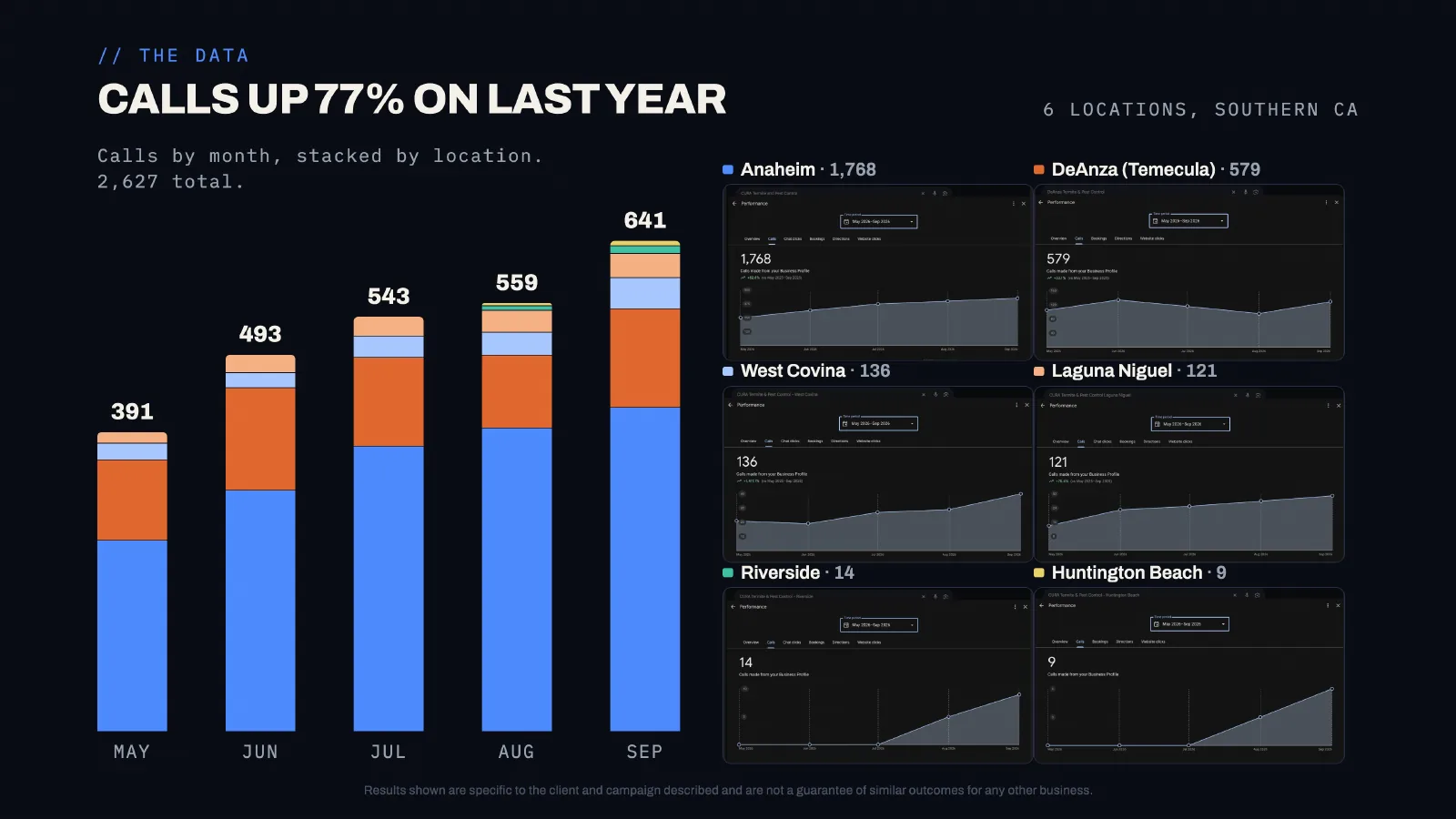
Cura Termite & Pest Control runs six offices, each with its own Google profile and location pages on its site. Its calls from Google rose every month from May to September 2026, to 2,627 for the period, up 77% on the year before. For how the profile side works, see our Google Maps guide for pest control.
What did the $107K/month audit show?
In the video above, Bodhi reviews the site of a New Jersey pest control company doing about $107K a month. A few lessons apply to almost any pest control site:
- Dated isn't the same as broken. The site looked "like it's from 2015," but it had content worth keeping. A modern front end, not a rebuild from scratch, was the recommendation.
- Local targeting was the gap. The company served several counties without pages or profiles built for them.
- Reviews need proof. A reviews page that doesn't link out to Google "could be completely fake" to a visitor.
- Growth comes from adding coverage, meaning pages and real locations for the areas the company already serves, not from tweaking the homepage.
How many pest and town pages should a pest control website have?
As many as you can write something true and specific on, and no more. Homeowners search the pest and the place together, like "wasp nest removal Edina" or "termite inspection North Canton," so the strongest sites have a page for each main pest and each town they really serve.
- Use the delete test. Remove the town name from a city page. If the page no longer says anything specific, it's a doorway page, and Google treats those as spam.
- Give each town page local substance. The pests that matter there, the housing types, seasonal patterns, the neighborhoods you cover and reviews from customers in that town.
- Build pest-plus-town pages only where demand is real, such as termites in a termite-heavy county or bed bugs in a dense city. Everywhere else, link the town page to the main pest pages.
- Match each Google Business Profile to its own location page, so the profile and the page confirm each other.
What results come from a site that works with the Google profile?
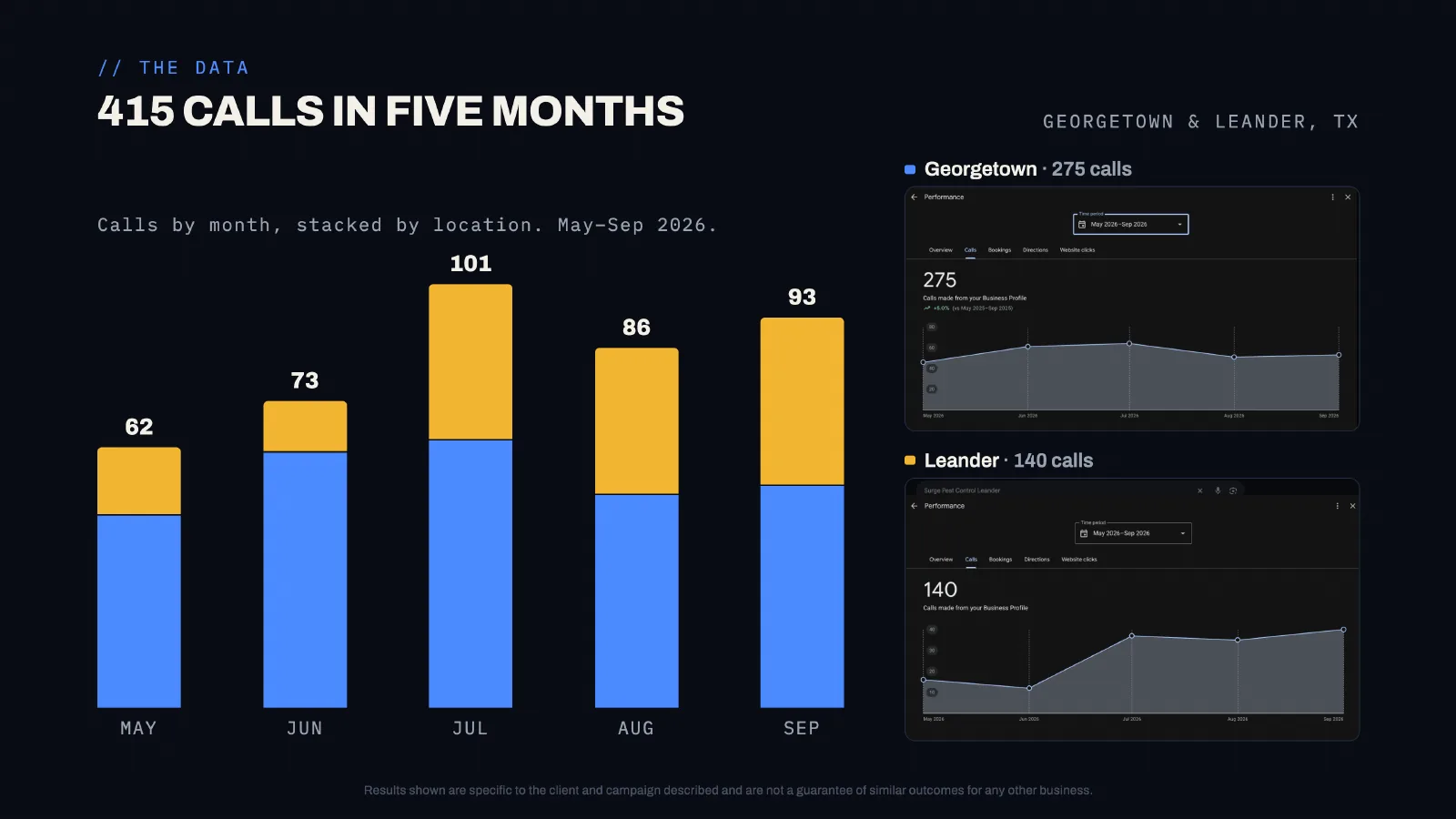
More calls from the profile itself, because the page the profile links to backs up what the profile says. Across our pest control clients, May to September 2026, calls from Google profiles linked to matching location pages included Cura Termite & Pest Control at 2,627 (up 77%), King Pest Solutions at 1,789 (up 47%) and Surge Pest Control at 415 across Georgetown and its newer Leander office.
What should you check before a new site goes live?
- Every old URL that had traffic redirects to the right new page.
- Phone numbers are correct and tappable on every page, and tracking numbers ring the right line.
- Every form submits, arrives in the right inbox and CRM, and shows a thank-you page.
- Pages pass a mobile check: no sideways scrolling, readable text, buttons big enough to tap.
- Core Web Vitals are in the "good" range for the homepage and top pest pages.
- Titles and headings are unique on every page.
- Structured data validates and matches each location's Google profile.
- Analytics and Search Console are installed and owned by your company, and the new sitemap is submitted.
- Google profiles link to the right location pages.
- No placeholder text, stock "lorem ipsum" or test pages are live.
Who should own your website?
You should. Your company should own the domain name, the hosting account (or have admin access to it), the site's content and the analytics and Search Console accounts. Agencies can manage them, but if you ever part ways, you should be able to move without starting over. Ask whoever builds your site to confirm this in writing before work starts.
How do you measure whether the site works?
Measure calls, forms and booked jobs from the website by page, not traffic:
- Calls and forms from the website by page, from call tracking and analytics.
- Leads from the website that booked and that signed up for a plan, from your CRM.
- Organic search traffic and rankings for your main pests and towns, from Search Console.
- Mobile speed and Core Web Vitals for your top pages.
- Conversion rate: leads divided by visitors, checked after every major change.
Our full pest control marketing guide covers how the website fits with your Google profile, ads and other channels.
Step-by-step: building a pest control website that gets calls
- Plan pages from keyword research. Every pest you treat, every office, the towns around each office, plans and commercial.
- Secure ownership. Domain, hosting, analytics and Search Console in your company's name.
- Build a fast mobile design. Tap-to-call header, short forms, real photos, and Core Web Vitals in the "good" range.
- Write each pest and city page from scratch. Signs, treatment, prep, plan coverage, local details and reviews.
- Add trust signals. License numbers, real reviews linked to Google, technician photos, honest treatment information.
- Add structured data and tracking. LocalBusiness for each location, Service for each pest page, call tracking and form tracking.
- Link Google profiles to location pages. Each profile to its own office page, with a tracking tag.
- Review results monthly. Calls by page, rankings, and which pages need work next.
Common pest control website mistakes
The two most common are a single "Services" page for every pest and city pages that only swap the town name:
- One "Services" page listing every pest in a line.
- City pages that are the same text with the town name swapped.
- Phone number only on the contact page.
- Stock photos instead of real technicians and trucks.
- Claiming treatments are "safe" or "harmless."
- Reviews pages with no link to the real source.
- Review stars added through structured data for your own reviews.
- Redesigns that change every URL without redirects.
- Long forms with ten fields.
- An agency or former employee owning the domain.
How we help with pest control websites
We build and improve pest control websites as part of our SEO and Google profile work: pest and city pages written from scratch, location pages tied to each Google profile, fast mobile templates, structured data and call tracking. When a site ranks but looks dated, we often refresh the front end and keep what works, the approach Bodhi recommended in the audit above. See the results our clients' pages produce in our pest control case studies.